Windows Server 2016 has been a trusted platform for many businesses. But its end of life is approaching, and that means change is coming. If you wait too long, you risk downtime, security issues, and unexpected costs. Here’s what you need to know and how to plan ahead.
What Is Windows Server 2016 End of Life?
End of life means Microsoft will stop supporting Windows Server 2016. No more updates, no fixes, and no help if something goes wrong. For your business, that means:
- Higher risk of cyber attacks
- Compliance challenges
- Increased costs if you delay
- Possible disruption to daily operations
Learn more about Windows Server 2016.
When Does Support End?
Windows Server 2016 extended support ends on 12 January 2027. That might sound far away, but planning now is essential to avoid last-minute stress.

Why You Should Act Now
Leaving this until the last minute can lead to:
- Rushed decisions and higher costs
- Limited availability of skilled engineers
- Stressful migrations during busy periods
Planning early gives you:
- Time to budget for the upgrade
- A smooth migration with minimal downtime
- Peace of mind knowing your systems are secure
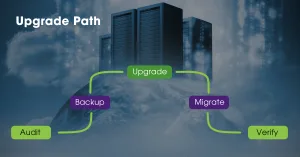
Your Upgrade Path
Prepare for life after Windows Server 2016 with options for on-prem Server 2022 or Azure cloud.
Our proven 5-step process works for both:
-
Audit – We inventory your servers, apps, and dependencies
-
Backup – Complete data protection before any changes
-
Upgrade – Modernise to latest Windows Server on-prem
-
Migrate – Seamless shift to Azure cloud (or hybrid)
-
Verify – Full testing and monitoring for flawless performance
FAQs
When does Windows Server 2016 support end?
12 January 2027. After that, Microsoft stops updates and fixes.
Can I delay the upgrade?
You can, but risk and cost increase the longer you wait.
Will this affect my business operations?
Not if you plan early. We schedule migrations to avoid disruption.
What happens if I do nothing?
Your system becomes vulnerable to security threats, compliance failures and costly downtime.
Is Windows Server 2022 the only option?
No. You can upgrade to Windows Server 2022 or move to Azure for cloud flexibility.
Will upgrading improve performance?
Yes. Windows Server 2022 offers faster processing, better scalability and advanced security features.
Is cloud more expensive than on-premise?
Not always. Azure often reduces hardware costs and offers pay-as-you-go pricing.
How long does migration take?
It depends on your environment, but early planning allows phased migration with minimal disruption.
What is the ROI of upgrading?
Improved security, compliance, and efficiency reduce risk costs and protect revenue.
Start planning today. We will help you map out the best approach for your business.
Contact us to book a quick call.
Don’t wait until the deadline catches you off guard. Let’s make sure your business is ready and secure.
Written by: Jolene Oelofse – Marketing Lead, Hybrid Technology Partners
Jolene leads Hybrid TP’s content strategy, translating complex IT and cybersecurity topics into practical insights for Irish SMEs. She collaborates closely with the technical team and Managing Director Paul Browne to ensure every article reflects real-world accuracy and business value.